post · · 5 min read · By Jeff Neet
Finding the art I already own
I own nearly 30,000 3D models, made by people, that I could only find by file name. So we taught my computer to look at them, and released the tool as open source.
Ask an AI agent for a barrel and it will make you one. I’d rather it found one of the barrels I already own, made by an artist and paid for years ago. The trouble was that nobody, me included, could find them. My asset packs hold 29,582 models, and until this month the only way to search them was by file name.
So we built a search that looks at the models. It now covers all 160 packs, everything runs on my laptop with no cloud calls, and it’s open source as Asset Archaeologist.
How it works
- Unpack. A script takes a pack from the backup drive, unpacks it, and picks one file per model, skipping the collision meshes.
- Render. Blender, run without a window, draws each model five ways: front, back, left, top, and a three-quarter view. It takes about 0.6 seconds a model.
- Sheet. Pillow crops the renders into a thumbnail, a five-view sheet per model, and contact sheets of the whole pack with names. Each model’s size in metres and its triangle count go in an index.
- Embed. SigLIP, a model that puts pictures and words in the same space, runs on the laptop’s GPU over every view, and over each model’s cleaned-up file name.
- Search. A query ranks every model by how well its pictures and its name match. An agent gets back the model’s name, where it lives in the pack, its size and its thumbnail, and can open the thumbnail to look before it chooses.
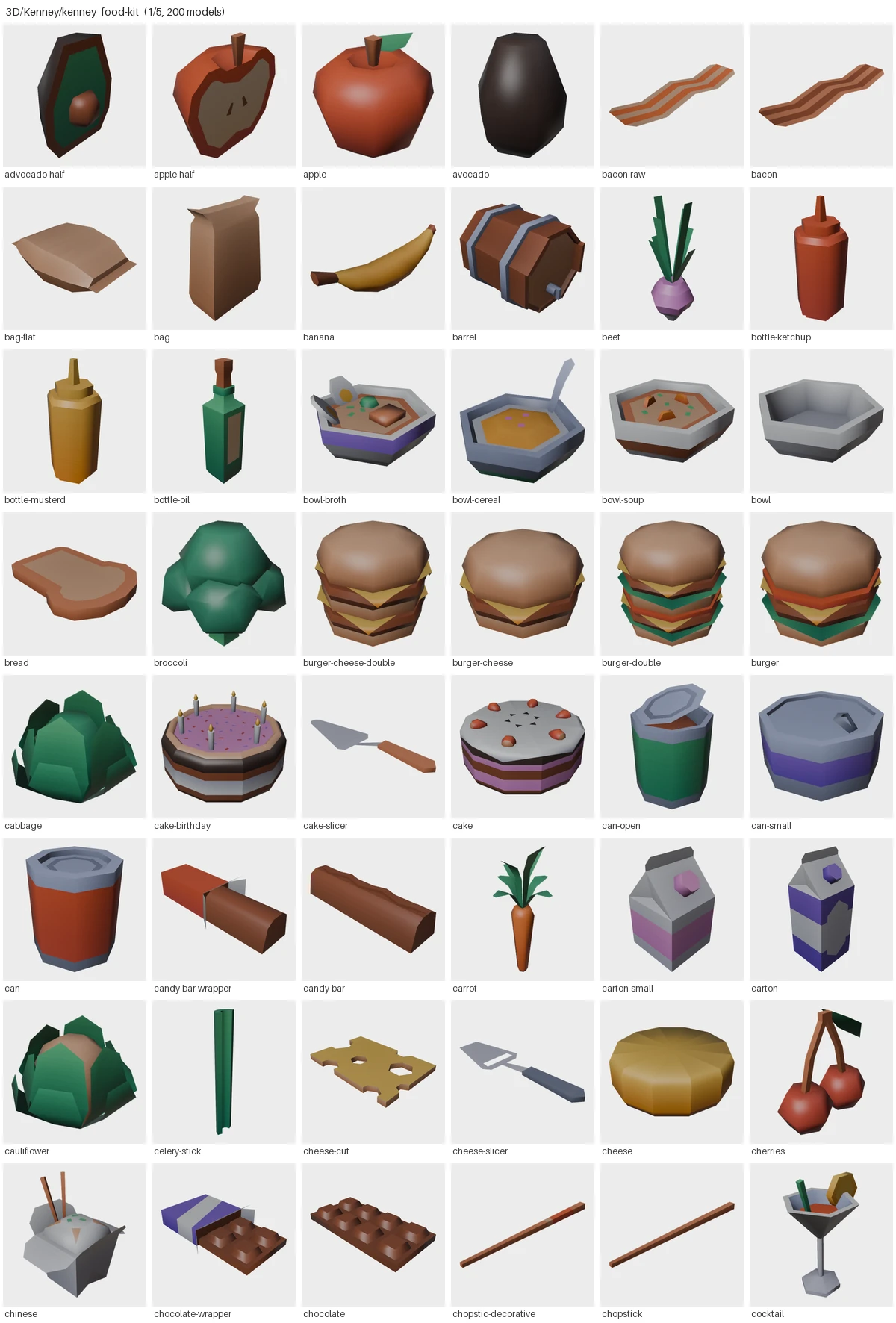
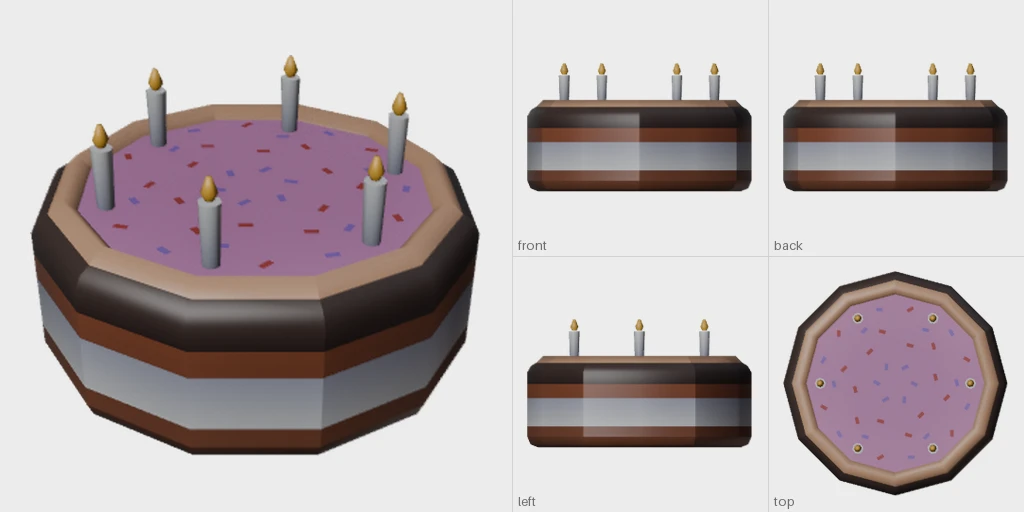
The food is from Kenney’s Food Kit, which is free to use and share. The barrels and goblins further down are from Synty’s POLYGON Goblin War Camp, and are Synty’s work.
- models catalogued, from 160 packs
- 29,582
- to render and embed them all, on a laptop
- 7.4 hours
- failed to render
- 647
It reads more than plain model files now. Unity packages open without Unity, and Blender files are split into one entry per prop: the Vintage Liminal Props pack’s 8 files became 147.
What it finds
These came from the two-pack pilot, before the full run:
- “A wooden barrel” returned the Synty pack’s four barrels, then Kenney’s.
- “A cooking pot over a fire” returned Kenney’s pot of stew, pan of stew and pot, then Synty’s fire pit and campfire. Results mix freely across packs.
- “A goblin king with a crown” returned the two goblin kings.
- “Similar to this barrel” returned the other three barrels, then a crate and a tub.

In the pilot, the lookup itself took about 0.14 milliseconds over 800 models. A whole search took 24 seconds, almost all of it loading SigLIP from cold. Next is a small server that keeps the model loaded, so searches come back instantly.
What it got wrong
- “Something to cut food with” returned a burger, a cake and a hot dog. The kit has six knives and slicers.
- Pictures alone weren’t enough. Before file names were added, “a slice of pizza” put a cookie first and missed the pizza. Flat low-poly renders hide things a file name says outright, so search now uses both.
- Automatic tags are unreliable. The avocado half, top left on the sheet above, was tagged “a shield”.
What was hard
Most of the work was making renders honest:
- Hidden meshes. One Synty building carried a shadow mesh about 900 units wide, so a 13-metre barracks rendered as a speck until those meshes were hidden.
- Missing textures. The pack’s models point at the artist’s Photoshop file, which the pack doesn’t include; it ships PNGs under other names. 252 of 580 models came out magenta until the script learned to look for them. Now 4 do.
- Many models in one file. One character file is 17 goblin outfits on one skeleton, all standing in the same spot. Rendered as-is it was one muddled figure, so each outfit now gets its own entry.
- The wrong texture. A sword rendered pitch black because Blender showed its glow map instead of its colour.
- Textures kept elsewhere. One vendor ships its textures in a separate download, so every one of its models came out magenta at first.
- A ball under every character. Blender’s importer adds a hidden bone-display ball to rigged characters, and it showed up under every character from two packs.
- Too clever by half. A modular character was split into its body parts, as if each were an outfit.
- Memory. The tool re-read each pack’s data once per model and climbed to 12.7 GB of memory before the batch stalled.
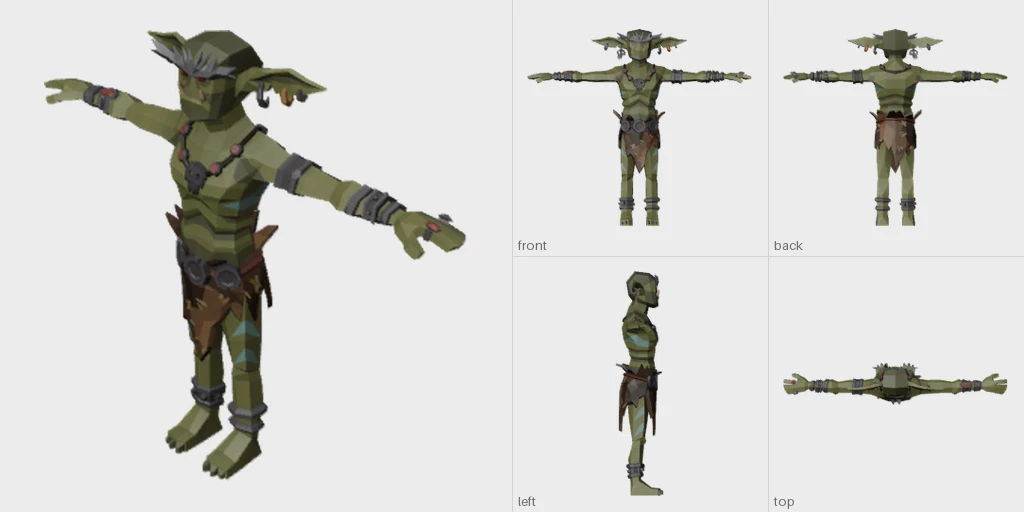
It’s still not perfect. About 11% of models render plain grey, because their colour texture isn’t in the pack at all, and 3 small packs still show magenta, down from 14.
The decisions that shaped it
The idea was mine: a picture of every model, so nobody guesses from file names. I asked for every side plus a perspective view, and we settled on five after agreeing the right side and bottom rarely add anything. Reusing SigLIP came from my photo archive project, where it already runs on the same laptop. And asking for a test on character files is what exposed the 17 outfits in one file.
The agent’s first instinct is to make something. This gives it a way to find something a person already made.
Try it
The tool is free and open source as Asset Archaeologist, under the MIT licence. Its tagline is mine: “Enable agents to find human art you already own.” Setup is tested on Windows; Mac and Linux are marked as needing testing. Next on my list is a small server that keeps the model loaded, so searches come back instantly.
If you have a drive of asset packs you’ve stopped opening, render them and search the pictures and the names together. Either alone misses things.